Sends a custom HTTP response to the calling application, completing the journey
The html response type is deprecated and reaches end of life on January 10, 2027 for sandbox environment and on January 17-18, 2027 for production regions. After this date, HTML is no longer supported and any remaining HTML responses are served as text/plain. To update your journeys, see Migrate from HTML responses.
The HTTP Complete Journey step is a core component of Backend API Journeys, designed to finalize backend-to-backend workflows by generating a structured HTTP response. It is specifically tailored for responding to RESTful API calls, making it ideal for integrations requiring data processing, validation, or authentication.
This step allows you to define the response type and payload, including the HTTP status code and any additional data, to meet the specific requirements of the calling application. Common use cases include signaling success or failure and returning data for integration with external systems.
By default, the HTTP Complete Journey step is included in all journeys created using the Backend API (single call) journey type, ensuring seamless completion of backend workflows.
To learn more about backend API journeys, see our dedicated page.
| Field | Description |
|---|---|
| Response Code | The HTTP status code and description to return in the response (e.g., 200 OK for success or 400 Bad Request for error). Supports 2xx, 3xx, 4xx, and 5xx status codes with their descriptions. |
| Redirect URI | The URI to include in the Location header for redirection responses (3xx). For example, https://www.demoapp.com/login?error=auth_failed. |
| Response Headers | Custom headers to include in the HTTP response, such as Cache-Control, X-Custom-Header, etc. |
| Response Type | The format of the response body, which determines the Content-Type header. Supports text and json. The json type accepts any valid JSON value (object, array, string, number, boolean, or null) and is returned with Content-Type: application/json. The html type is deprecated; see Migrate from HTML responses. |
| Body | The content of the response body. |
This step can be configured to record step input and output data, or a custom payload, which is then surfaced in journey events in Journey Analytics for diagnostic purposes. For details, see Additional data reporting.
This example demonstrates how the HTTP Complete Journey step is used to respond to a backend API call that validates a transaction. The journey evaluates two conditions:
- Access and ID token expiration: Verifies the validity of the
external_access_tokenprovided by an external system. - Multi-Factor Authentication (MFA): Checks whether MFA has been performed using the
amrclaim from theexternal_id_token.
- If the external tokens have expired, the journey rejects the transaction with a
401 Unauthorizedresponse. - If MFA has not been performed, the journey triggers a client journey with a
307 Temporary Redirectresponse. - If both conditions are satisfied, the journey approves the transaction with a
200 OKresponse.
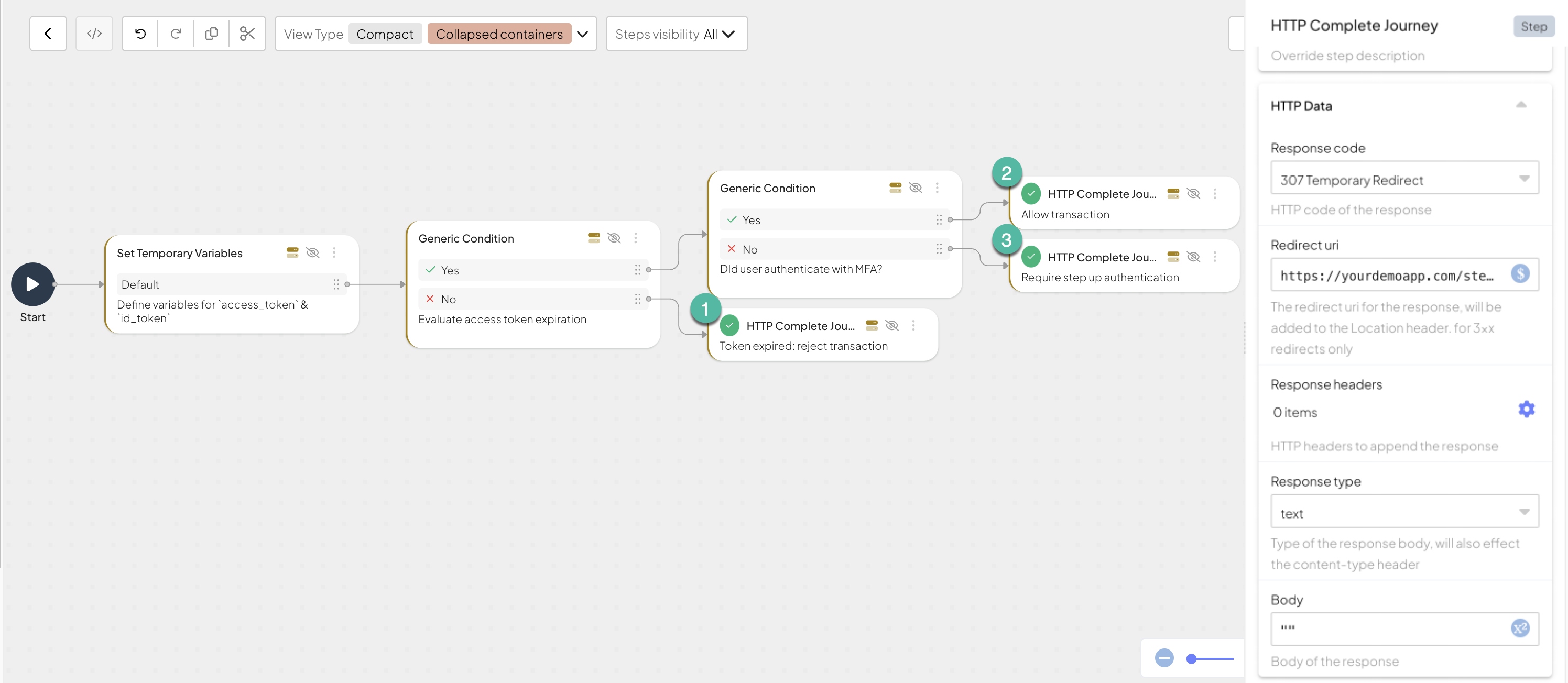
Below are the configurations for each HTTP Complete Journey step in this example:
| Step | Description | Response Code | Redirect URI | Response Type |
|---|---|---|---|---|
| 1 | Rejects the transaction due to expired external tokens | 401 Unauthorized | ||
| 2 | Approves the transaction | 200 OK | ||
| 3 | Triggers step-up authentication | 307 Temporary Redirect | https://yourdemoapp.com/stepup | text |
To invoke the journey, use the following curl command:
curl -X POST "https://api.transmitsecurity.io/ido/api/v2/invoke-api-journey/[JOURNEY_ID]?clientId=[CLIENT_ID]" \
--header "Content-Type: application/json" \
--header "Authorization: Bearer <[CLIENT_TOKEN]>" \
--data '{
  "external_access_token": "eyJhbGciOiJSUzI1NiIsInR5cCI6IkpXVC...",
  "external_id_token": "eyJhbGciOiJSUzI1NiIsInR5cCI6IkpXVC..."
}'The Authorization header must include a Mosaic client access token to validate the backend API call. For more details, see our Get Client Access Token API reference.
html is no longer a Response Type option for new steps or journeys. Opening an existing journey in the Journey Builder automatically converts html steps to text. The change is saved the next time you save the journey.
Existing html steps keep returning HTML until end of life on January 3, 2027. After that, Mosaic serves responses from html steps, including steps in journeys configured via API or import, and text steps with a custom Content-Type: text/html header as text/plain with X-Content-Type-Options: nosniff, even if you never open or save the journey. Browsers display these responses as plain text.
Replace HTML responses using the step's configuration or your own hosting.
- Use a redirect for SSO, logout, and other navigation flows: Set Response Code to a
3xxstatus such as302 Foundor303 See Other, and Redirect URI to the page where users should land (for example, after a session or flow ends). - Use a JSON response for API and single-page app integrations: Set Response Type to
jsonand return the data or journey status in Body. Let the calling application or your frontend render the UI or handle navigation. - If the journey served full web pages or scripts, host them on your own domain or frontend.