This article shows how to create a ruleset on Agent Intelligence data, add rules, and publish it. For the concepts behind policies, rulesets, data sources, and modes, see How policies work.
In the Admin Portal, go to Agentic Trust > Agent Governance > Policy Management. The list shows each ruleset, its data source, and its mode.
Add a ruleset, then give it a name and an optional description.
Under Data sources, add a source and select the one your rules evaluate. For agent decisions, select Agent Intelligence. Its signals then become available to your rules.
You cannot change the data source after the ruleset is published.
Each rule combines one or more conditions with a result. To add a rule:
- Add a condition and select a signal.
- Choose an operator, such as Is, and a value.
- To match on more than one signal, add conditions and combine them with And or Or. Not negates a group. Add a group for nested logic.
- Set the result to Allow, Challenge, or Deny.
- To add more rules, select Add rule. Rules are evaluated in order, and the first match wins.
If none of the rules apply, the ruleset defaults to Allow. This is shown at the bottom of the ruleset. Write a rule for every case you want to challenge or deny. Anything that does not match a rule is allowed.
A rule can match on any Agent Intelligence signal. The signals most useful for agent decisions are:
| Signal | What it describes |
|---|---|
| Current Actor | Who is acting at the time of the call: HUMAN, AGENT, BOT, or UNKNOWN. |
| Classification Status | Whether the session's actors have been classified yet. |
| Session Actors | Every actor seen in the session so far. |
| Current Platform ID | The agent platform acting now, when the current actor is an agent. |
| Current Platform Family | The family of the platform acting now. |
| Detected Platform IDs | Every agent platform seen in the session. |
| Detected Family IDs | Every agent family seen in the session. |
Session, device, and network signals, such as Session Entry Page, Device ID, and IP Country, are also available for finer conditions.
Use a platform ID or family when you match on Current Platform ID, Current Platform Family, Detected Platform IDs, or Detected Family IDs. unknown is an agent or bot that is not named. none means no non-human actor is acting now. Use unknown when a rule should deny unidentified agents.
Agent platforms
| Platform ID | Family | Display name |
|---|---|---|
unknown | unknown | Unidentified agent or bot |
none | none | No non-human actor |
chatgpt_agent | chatgpt | ChatGPT Agent |
chatgpt_atlas | chatgpt | ChatGPT Atlas |
chatgpt_extension | chatgpt | ChatGPT Extension |
codex_agent | codex | OpenAI Codex |
claude_code_browser | claude | Claude Code (embedded browser) |
claude_extension | claude | Claude for Chrome |
comet | perplexity | Comet |
perplexity_computer | perplexity | Perplexity Computer |
cloudflare_browser_rendering | cloudflare | Cloudflare Browser Rendering |
cursor_browser | cursor | Cursor (embedded browser) |
devin | devin | Devin |
manus | manus | Manus |
genspark_browser | genspark | Genspark Browser |
genspark_extension | genspark | Genspark Extension |
automa_extension | automa | Automa Extension |
harpa_extension | harpa | HARPA AI Extension |
kitesurf_agent | kitesurf | Kitesurf Agent |
muse_agent | muse | Muse Agent |
openclaw | openclaw | OpenClaw |
openwork | openwork | OpenWork |
skyvern | skyvern | Skyvern |
cybaa_agent | cybaa | Cybaa Agent |
google_prometheus_bot | google_prometheus | Google Prometheus Bot |
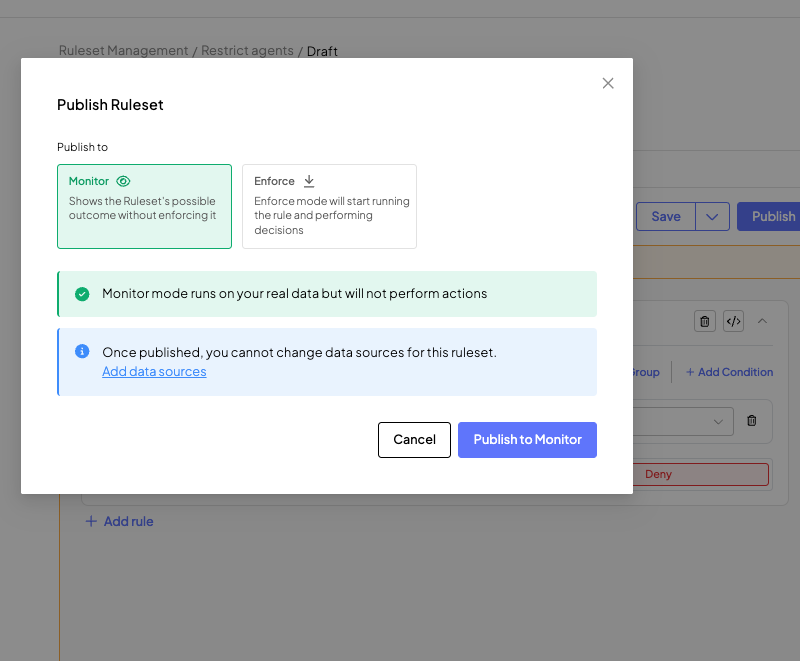
Save the ruleset, then publish it and choose the mode:
- Monitor: Agent Governance evaluates the ruleset on your real data and logs the result, but does not perform any action. Use it to check the ruleset before it affects your application.
- Enforce: Agent Governance evaluates the ruleset and returns the result for your backend to act on.
Publishing locks the ruleset's data source. You can still edit the rules in the draft and publish again. You can promote a ruleset from Monitor to Enforce. You cannot move it from Enforce back to Monitor.
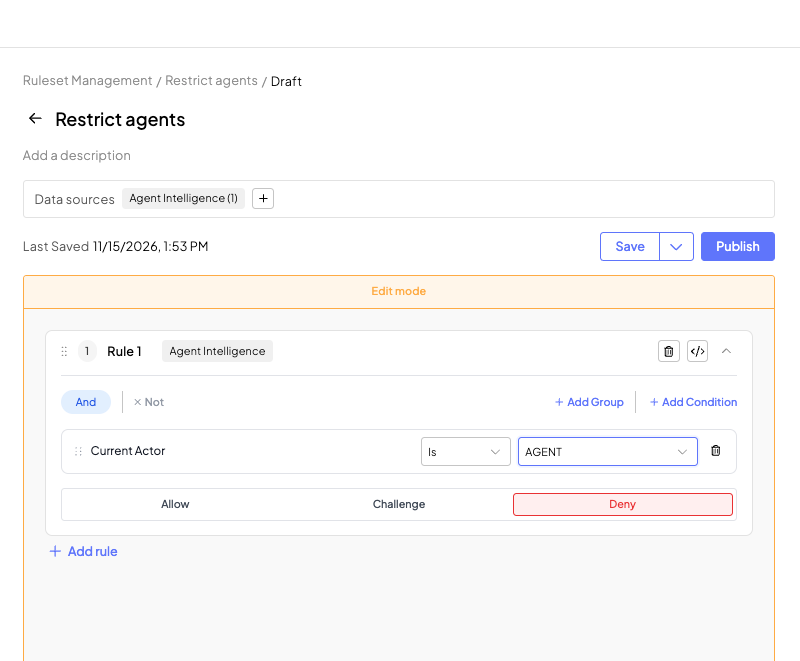
For example, suppose you want to deny any session where an agent is acting, and let people through. The following ruleset has a single rule.
- Create a ruleset and name it, for example, Restrict agents.
- Add the Agent Intelligence data source.
- In the rule, set the condition Current Actor Is AGENT, and set the result to Deny. With no other rule, every session that is not an agent falls through to the default Allow.
- Publish the ruleset. Start in Monitor to confirm the result on your real traffic, then promote it to Enforce.
To call an enforced ruleset from your backend and act on the result, see Integrate Governance with Agent Intelligence.