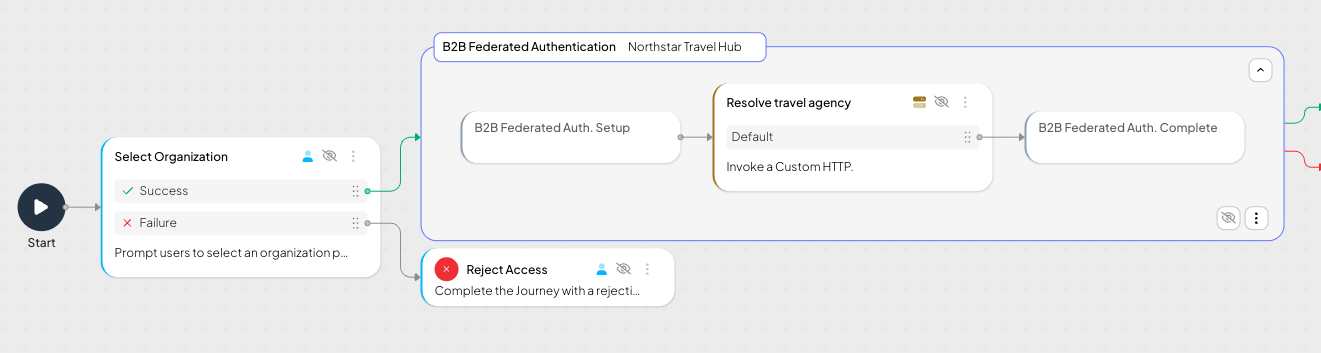
Authenticates a B2B user with an external IDP and creates the local Mosaic session.
This step delegates user authentication to an external IDP over SAML 2.0 or OIDC, then establishes the local Mosaic session for the resolved user. Use it when your B2B app relies on external IDP federation but needs to apply additional identity logic before the user is treated as authenticated by Mosaic.
The step includes two mandatory, non-removable substeps that define the start and end of the composite block:
- B2B Federated Auth. Setup — initiates the federation handshake with the configured IDP, validates the response, and outputs a structured identity context, such as raw claims, mapped attributes, group memberships, and IDP metadata.
- B2B Federated Auth. Complete — consumes the resolved internal user ID and establishes an authenticated Mosaic session.
Between these substeps, the composite block provides a configurable insertion zone for the journey logic that connects the federated identity from the IDP to a local Mosaic user. This lets you resolve or create the user, apply policy checks, and prepare the internal user ID required to establish the Mosaic session.
Each substep exposes its own success and error branches, so you can route the journey independently after federation and after session establishment. For the underlying federation flows, see Federate SSO with your SAML IDP and Federate SSO using custom OIDC IDP (B2B).
Between B2B Federated Auth. Setup and B2B Federated Auth. Complete, you must add journey steps that resolve the federated identity into a local Mosaic user. The Setup substep exposes the IDP identity context to this zone, and the Complete substep expects a resolved internal user ID to establish the session.
Typical journey logic you place in this zone includes:
- User lookup or just-in-time creation, for example using Retrieve Custom User Data or Invoke Custom HTTP.
- Attribute or role mapping from the IDP claims to your authorization model.
- Policy enforcement, such as a Fraud Level Analysis check or step-up authentication.
- Fallback routing for unassigned members or missing data.
If the custom logic doesn't produce a resolved internal user ID, the Complete substep can't establish the Mosaic session, and the composite step exits via the Failure Behavior configured on the parent step.
These fields apply to the B2B Federated Authentication composite step as a whole.
| Field | Description |
|---|---|
| External user id | Defines the user context for reading the message. - For authenticated users, this can be an expression containing an external user id (e.g., @policy.userContext().external_user_id).- If the user hasn't authenticated, the external user id can be set in a variable. |
| Organization Context | Determines which organization is used for B2B federation. - Default: use the organization already present in the journey context, typically established earlier in the flow through organization selection or resolution logic. - Manual: provide the organization explicitly, for example from a journey expression or previously computed journey state. |
| Error Output Variable | Name of the variable that stores any error returned by the step. |
| Failure Behavior | Determines the behavior in case of failure, which either aborts the journey (default) or proceeds to a failure branch of the control flow. |
This step can be configured to record step input and output data, or a custom payload, which is then surfaced in journey events in Journey Analytics for diagnostic purposes. For details, see Additional data reporting.
After all included substeps run, this step produces two branches:
- Success — the Mosaic session was established for the resolved user.
- Error — session establishment failed (for example, the resolved user could not be set as authenticated).
Initiates the federated authentication handshake with the configured enterprise IDP. Upon a successful IDP response, this substep exposes the raw claims and mapped attributes to the insertion zone, where you can add custom journey logic before completion.
| Field | Description |
|---|---|
| External user id | Defines the user context for reading the message. - For authenticated users, this can be an expression containing an external user id (e.g., @policy.userContext().external_user_id).- If the user hasn't authenticated, the external user id can be set in a variable. |
| Organization Context | Sets or overrides the organization used during the setup phase. - Default: use the organization already present in the journey context, typically established earlier in the flow. - Manual: specify the organization explicitly via the Organization ID field that appears below. |
Consumes the resolved internal user ID produced by the insertion zone and establishes the authenticated Mosaic session.
| Field | Description |
|---|---|
| Error Output Variable | Variable that stores any error returned by the completion phase. Defaults to error. Use it to drive error-handling logic in subsequent journey branches. |
Suppose your application is Northstar Travel Hub, a B2B travel platform used by multiple travel agencies corresponding to separate organizations in Mosaic. Each organization has its own external IDP. For example, Northway Travel signs in employees with Okta, while Bluewave Travel uses a SAML-based corporate IDP. Earlier in the journey, the organization context is set for the flow. Alternatively, set Organization Context to Manual on this step and supply the organization ID.
When the journey reaches B2B Federated Authentication, the B2B Federated Auth. Setup substep uses that organization context to authenticate the user with the correct external IDP. In this example, Organization Context is set to Default, so if the journey has already determined that the user belongs to Northway Travel, the step uses the IDP configured for that organization.
Between B2B Federated Auth. Setup and B2B Federated Auth. Complete, the journey uses Invoke Custom HTTP to call a backend service that resolves the federated identity to a local Mosaic user. For example, after a Northway Travel employee authenticates with Okta, the backend can evaluate claims returned by the IDP, such as email, subject identifier, or agency-specific attributes, and return the internal Mosaic user ID for that employee.
The B2B Federated Auth. Complete substep then consumes that internal user ID and establishes the authenticated Mosaic session. If the backend service can't resolve the user, the journey can route to the failure branch or to additional handling logic before session establishment.