Reports the outcome of a previously triggered or evaluated action to Fraud Prevention
This step is used to report the outcome of an action that Fraud Prevention already issued a recommendation for, such as a login assessed by the Fraud Level Analysis step or a payment assessed by the Evaluate Transaction step. It reports whether the action succeeded, which challenge (if any) was presented to the user, and the identity of the user once it's known.
Use this step after the user completes the action, for example after any required step-up authentication. Reporting the outcome adds context that Fraud Prevention uses for future risk assessments. Reporting a user ID on a successful login-type action also sets the user for all subsequent events in the device session. For other actions, such as transactions, the user is set for that action only. To report an outcome, the step needs the action token returned when the action was triggered or evaluated.
You can report the outcome of the same action multiple times, for example after each authentication factor. This lets you see that the first factor succeeded but the second factor failed.
The step sends the outcome to Fraud Prevention, but the reported outcome doesn't determine how the journey proceeds: if the report is submitted successfully, the journey continues to the next step, even when the reported outcome is Failure or Incomplete. The step fails only if the report can't be submitted, for example due to a network error, a timeout, an invalid action token, or a service error. In this case, the journey proceeds according to the Failure behavior setting.
Reported outcomes are stored with the action. You can review them on the Recommendations page (Admin Portal > Fraud Prevention > Recommendations), for example by filtering on Action result, or retrieve them using the Search actions API, which returns them in recommendation.result and recommendation.challenge_type.
| Field | Description |
|---|---|
| Action token | Expression that yields the token of the previously triggered or evaluated action whose outcome is reported. Required. Use the action_token from the output variable of the preceding Fraud Prevention step:
<output_variable>.action_token. |
| Action outcome | Outcome of the reported action: Success, Failure, or Incomplete. This value doesn't determine whether the step proceeds to the success or failure branch. |
| User ID | Expression that yields the ID of the authenticated user. Set it when the user identity became known after the action was triggered. |
| Challenge type | Type of challenge presented to the user for the action. Select No challenge if no challenge was used. Other options: SMS OTP, Email OTP, TOTP, Push OTP, Voice OTP, Identity verification, CAPTCHA, Password, Passkey. |
| Error output variable | Name of the variable that stores any errors returned by the step. Default: error. |
| Failure behavior | Determines the behavior in case of failure, which either aborts the journey or proceeds to a failure branch of the control flow (default). |
This step can be configured to record step input and output data, or a custom payload, which is then surfaced in journey events in Journey Analytics for diagnostic purposes. For details, see Additional data reporting.
Consider a login journey that assesses the login attempt with Fraud Prevention before the user authenticates.
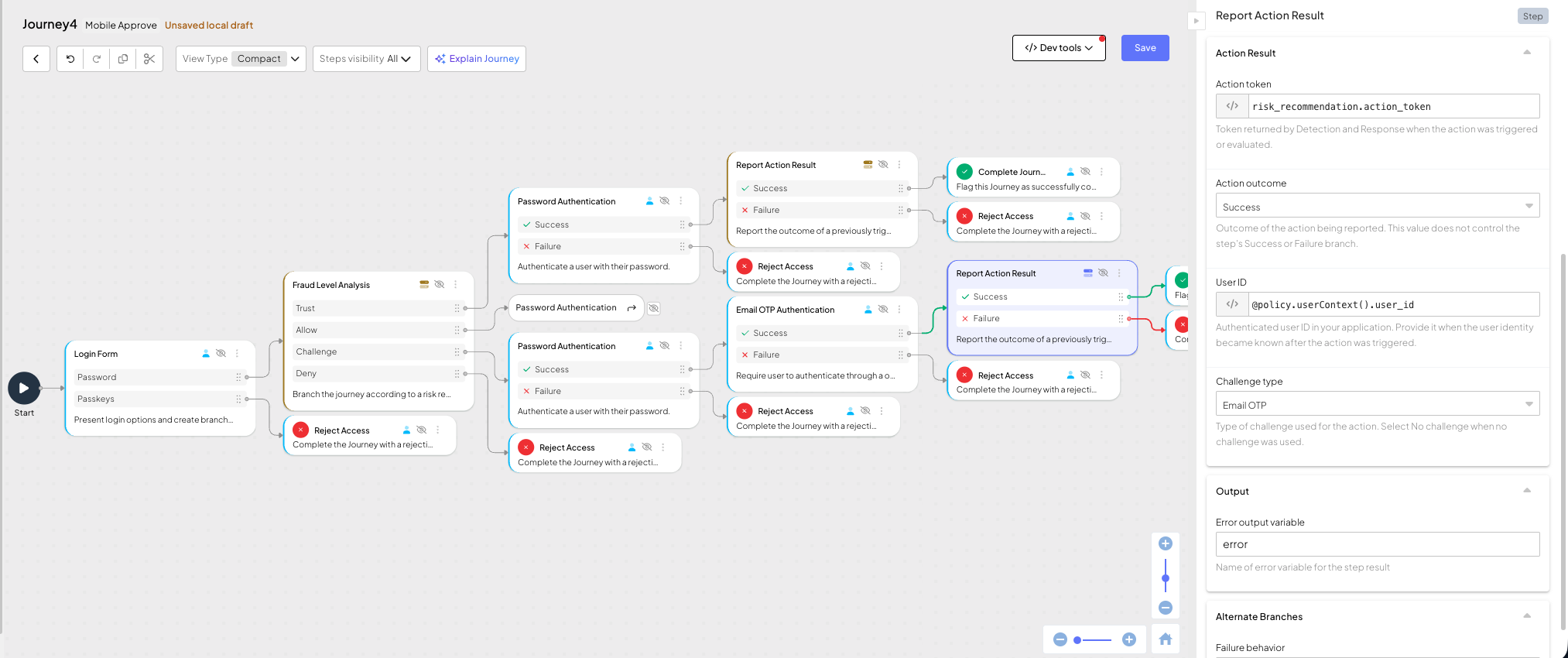
The Fraud Level Analysis step assesses the login action. On Trust or Allow, the user authenticates with a password. On Challenge, the user also completes Email OTP Authentication.
Once the user authenticates, the Report Action Result step reports the outcome of the login action. In the Challenge branch, the step is configured with:
- Action token:
risk_recommendation.action_token - Action outcome: Success
- User ID:
@policy.userContext().user_id - Challenge type: Email OTP
In the Trust and Allow branches, the step uses the same configuration, with Challenge type set to No challenge. Since the user identity is only known after authentication, reporting the User ID also sets the user for subsequent events in the device session.