Mosaic supports lockout policies to protect against brute-force attacks and unauthorized access.
All authenticators support a simple lockout policy, where after the lockout period expires, the user can retry authentication with a fresh attempt counter.
Passkeys, Passwords, TOTP, Face authentication, and PIN codes support progressive lockout tiers, providing enhanced security through escalating lockout durations that deter brute-force attacks.
A simple lockout uses a single threshold:
- After a configured number of failed attempts
- The authenticator is locked for a fixed lockout duration (in minutes)
After the lockout period expires, the user can retry authentication with a fresh attempt counter.
Example:
- After 3 failed attempts → Locked for 15 minutes
- After the lockout period expires, the user can try again with a fresh set of attempts
Available for Passkeys, Passwords, TOTP, Face authentication, and PIN codes.
Progressive lockout tiers apply escalating lockout durations based on consecutive failed attempts. You can configure up to 10 tiers.
Each tier include:
- Attempts — total number of consecutive failures required to trigger the tier (the count is cumulative and does not reset between tiers)
- Duration — lockout time in minutes for lockout. Users are automatically unlocked after each lockout period.
In addition, progressive tiers use a failed-attempt counting window (failuresExpireIn, in minutes). This window determines how long failed attempts are counted as consecutive:
- Only failed attempts within the last X minutes (where X is the
failuresExpireInvalue) are counted as consecutive. - If X minutes pass since the last failed attempt, all previous failed attempts expire and are no longer counted, and the attempt counter resets.
After all configured tiers are exhausted, additional consecutive failures result in a permanent lock that requires admin intervention—either via the Unlock authenticators API or directly in the Admin Portal by opening the authenticator details and selecting Activate (see Manage user authenticators). For details about lockout settings, see Customize login methods.
You can configure progressive lockout tiers:
- In the Admin Portal > Applications > your app > Authentication methods > Passwords, TOTP, Passkeys, Face authentication, or PIN codes. See Customize login methods.
- You can also manage lockout settings using the Login Preferences API. API support for lockout tiers depends on the authenticator—refer to the API schema for the supported fields.
Example
This example demonstrates a progressive lockout configuration with three tiers:
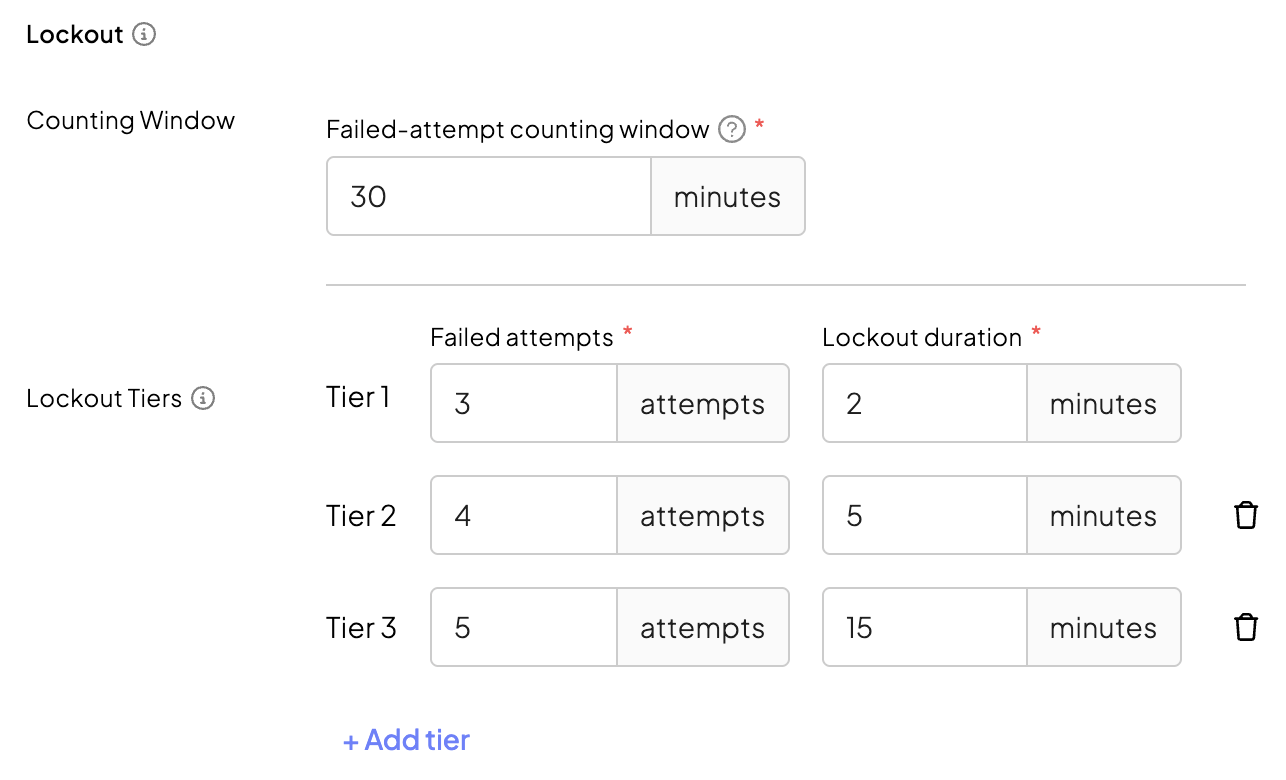
- after first three failed attempts, users are locked for 2 minutes
- after fourth failed attempt, 5 minutes
- after fifth failed attempt, 15 minutes
- in case of sixth failed attempt, permanent lock
The failed-attempt counting window is set to 30 minutes, meaning only failed attempts within the last 30 minutes are counted as consecutive. This ensures that when the Tier 3 lockout (15 minutes) expires, the previous failed attempts are still within the counting window and continue to be counted.
This translates into the following user flow: