Sets the ACR (Authentication Context Class Reference) value that will be included in the issued ID token
Use this step to set a custom ACR (Authentication Context Class Reference) value during SSO journey execution. The ACR value represents the authentication assurance level achieved during the journey. The ACR value is stored temporarily and included in the ID token issued upon successful authentication. Since only SSO journeys issue OIDC ID tokens, ACR customization applies exclusively to SSO journeys.
The ACR value represents the assurance level, not the authentication method. Authentication methods are recorded separately in the amr claim, which Mosaic populates automatically.
Use this step to:
- Set ACR values dynamically based on the authentication assurance level achieved in the journey. Define the ACR value to reflect the assurance achieved—for example, password authentication might map to
1.5, passkeys to2.5, and mobile biometrics to3.0. These values are fully customizable at the step level. - Include additional context in the ACR value (for example, transaction ID, timestamp, or other audit data)
Place this step after the authentication steps that determine the ACR value, and before the journey completes and the token is issued.
For more information about supported formats and how ACR values interact with OIDC requests, see Customize ACR values in ID tokens.
You may use multiple Set Dynamic ACR Values steps in the same journey when you need to:
- Use the ACR value later in the journey: For example, reference it in a Condition step or display it in a Display Information step.
- Replace the ACR value as the journey progresses: Each step represents the authentication assurance level achieved up to that point and replaces the previous ACR value. For example, set it to
"1.5"after password authentication, then replace it with"2.5"if additional authentication factors are required. This is useful in journeys with different authentication branches or step-up authentication scenarios.
As a general rule, each Set Dynamic ACR Values step overwrites the previous ACR value, so the last executed Set Dynamic ACR Values step determines the final acr claim in the ID token. If no Set Dynamic ACR Values step is executed, the token is issued without an acr claim.
You can access the current ACR value at any time during the journey using: @policy.getInteractionParameters().acrValues. This expression returns the most recently available ACR value, which may be:
- the
acr_valuesparameter from the OIDC request (if present and no Set Dynamic ACR Values step has run yet), or - the value set by the most recently executed Set Dynamic ACR Values step.
| Field | Description |
|---|---|
| ACR Values | An expression that evaluates to the ACR value to set. The value represents the authentication assurance level (e.g., "1.5" for password, "2.5" for passkey, "3.0" for mobile biometrics, or a composite format like `"assurance:1.5 |
| Error Output Variable | Name of the variable that stores any errors returned by action. |
This step can be configured to record step input and output data, or a custom payload, which is then surfaced in journey events in Journey Analytics for diagnostic purposes. For details, see Additional data reporting.
Suppose a bank wants to track the authentication assurance level achieved by customers when they log in. The bank offers multiple authentication options: password authentication combined with SMS OTP for standard access, and passkey authentication for enhanced security. The bank needs to set different ACR values in the token to reflect the assurance level achieved, so downstream systems can apply appropriate access controls and audit requirements.
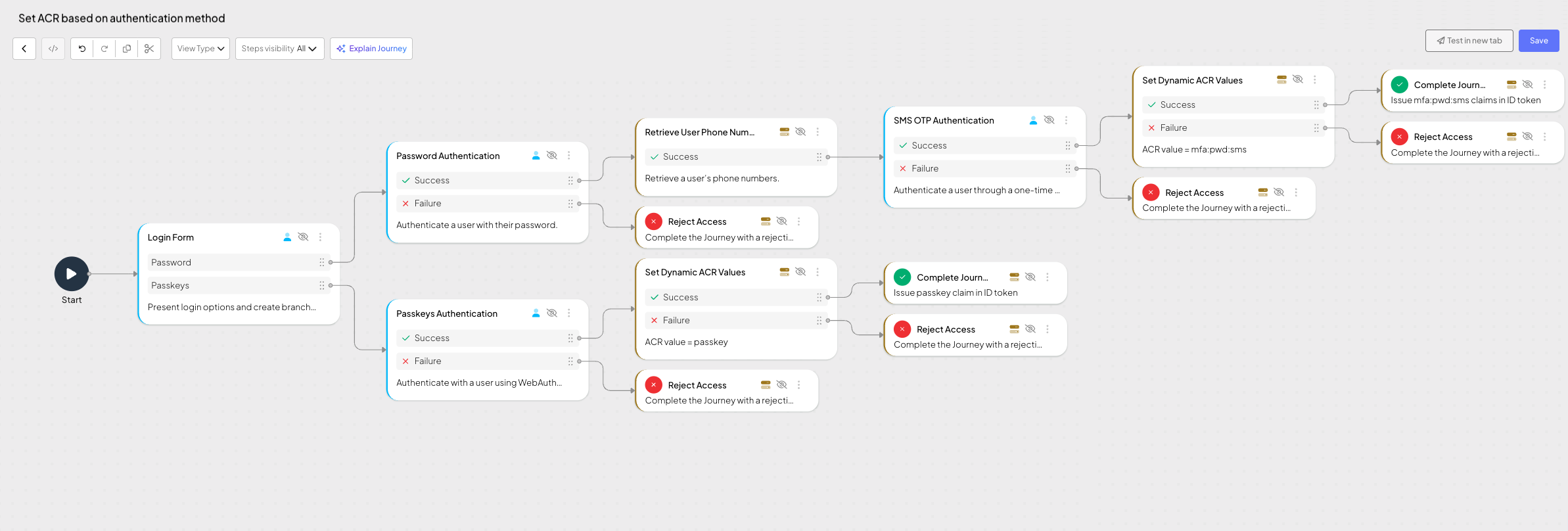
The user can choose between two authentication options: password or passkey. When they select password authentication, the journey first authenticates them with their password, then retrieves their phone number from their profile, and finally sends an SMS OTP for second-factor authentication. Once both authentication factors are completed, the journey sets the ACR value to "2.0" to reflect the higher assurance level achieved through multi-factor authentication (password and SMS). When the user selects passkey authentication instead, the journey authenticates them using their passkey and sets the ACR value to "2.5" to indicate the even higher assurance level achieved through passkey authentication. The final ACR value is included in the ID token issued upon successful completion of the journey.